The 10-Question Tech Audit Every Coach Needs
A systematic audit of your coaching tech stack — identify the gaps, redundancies, and bottlenecks that are costing you time and money.


Most coaches don’t know how much their tech stack is costing them — in both money and time. They have subscriptions they forgot about, tools that overlap, and manual processes that should be automated.
This tech audit walks through 10 questions. Each one identifies a specific gap, redundancy, or bottleneck. By the end, you’ll know exactly what to fix, what to cancel, and what to automate.
Question 1: How many tools do you pay for monthly?
List every tool subscription related to your coaching business:
- Website builder (Squarespace, Wix, WordPress hosting)
- Scheduling (Calendly, Acuity)
- Payments (Stripe, Square, PayPal)
- Email marketing (ConvertKit, Mailchimp)
- Client portal (Practice, Sessions)
- Course platform (Teachable, Thinkific)
- Community (Circle, Mighty Networks)
- Content tools (Canva, Descript, Otter)
- Storage (Google Drive, Dropbox)
- Calendar (Google, iCloud, Outlook)
The fix: Total them up. Most coaches have 6-10 subscriptions totaling $200-500/month. Consolidate where possible. A Grow or Scale plan replaces 5-7 of these with one integrated system.
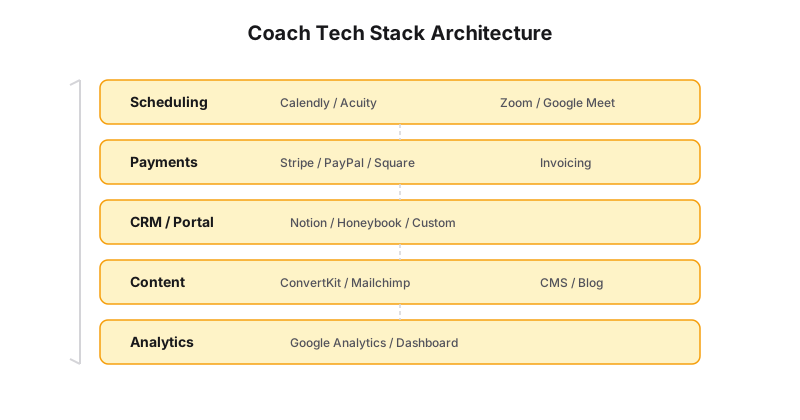
Question 2: Where does client data live?
Trace a client’s journey through your systems:
- They find you → social media or referral
- They sign up → email tool (ConvertKit/Mailchimp)
- They book → Calendly
- They pay → Stripe
- They onboard → intake form (JotForm/Typeform)
- You communicate → email + Slack/text
- They receive materials → Google Drive/email attachments
- You track progress → Notion/spreadsheet
The fix: Every transfer between tools is a place where data gets lost. If you’re manually copying client info from your intake form to your notes to your spreadsheet, that’s 10+ minutes per client that should be automated. Aim for one unified system or a Zapier connection that moves data automatically.
Question 3: When was the last time a client couldn’t book you?
If a potential client tries to book a discovery call and your calendar isn’t synced, your payment link is broken, or your booking page is confusing — they go to the next coach.
The fix: Run a test booking once a month. Use an incognito window, go through your full booking flow, and confirm every step works. If it takes more than 2 minutes from clicking “Book” to getting a confirmation, you’re losing clients.
Question 4: How many tools can clients log into?
Count the number of different logins your clients need:
- Your website
- Calendly (to book)
- Stripe (to pay)
- Zoom (to meet)
- Practice/Sessions (portal)
- Circle (community)
- Teachable/Thinkific (courses)
The fix: Every additional login is a barrier. Clients will forget passwords, lose links, and email you asking where to find things. A custom website consolidates everything — booking, payment, portal, community, courses — into one login on your domain.
Question 5: What are you doing manually that could be automated?
Common manual tasks in coaching businesses:
- Sending intake forms
- Following up on unpaid invoices
- Sending session reminders
- Writing session notes
- Creating social media posts
- Transferring client data between tools
- Sending welcome emails
The fix: Each manual task should take less than 2 minutes. If you’re spending 30+ minutes per client per week on manual tasks, automate it. See our AI automation guide for the specific tools and workflows.
Question 6: Are you paying for overlapping tools?
Common redundancies:
- Calendly + Acuity (both do scheduling)
- ConvertKit + Mailchimp (both do email)
- Notion + Evernote + OneNote (all do notes)
- Canva + Adobe Express (both do design)
- Zoom + Google Meet (both do video calls)
The fix: Pick one tool per category. Cancel the rest. If two tools partially overlap (e.g., Acuity does scheduling + payments, but you also use Stripe), evaluate whether one tool can replace both.
Question 7: Do you have a content system?
Most coaches create content reactively — a post when they have time, an email when they remember, a video when they feel inspired. This leads to inconsistent publishing and burnout.
The fix: A content system (see our content repurposing guide) should include: a backlog of ideas, a weekly creation workflow, a scheduling tool, and analytics to track what’s working. Content Brain automates most of this.
Question 8: What happens when something breaks?
If your website goes down, your payment link stops working, or your email tool stops sending — do you know how to fix it? Do you have someone who can fix it?
The fix: For DIY tools (Squarespace, WordPress), you’re on your own. For custom sites (Generativity Media), support is included. Know who to call when something breaks, and have a backup plan for critical systems (booking, payments, email).
Question 9: How much are you paying in transaction fees?
Stripe charges 2.9% + $0.30 per transaction. At $10,000/month in revenue, that’s $320/month in fees. But are you also paying additional fees for PayPal, Square, or platform-built payment systems?
The fix: Consolidate to one payment processor. Stripe is the most coach-friendly option for online businesses. If you’re paying an extra 1-2% through a platform like Practice or Kajabi, factor that into the true cost of those tools.
Question 10: If you had to rebuild your tech stack from scratch, what would you keep?
Go through every tool you use and ask: “If I was starting today, would I choose this tool again?”
Tools that survive this test are keepers. Tools that don’t are candidates for replacement.
The fix: Be honest. If a tool is “fine” but not great, replace it. The cumulative drag of mediocre tools is worse than the pain of switching.
The Audit Scorecard
Give yourself one point for each “yes”:
| Question | Yes/No |
|---|---|
| 1. You know exactly what you pay per month for tools | ☐ |
| 2. Client data lives in 3 or fewer places | ☐ |
| 3. Your booking flow works end-to-end (tested this month) | ☐ |
| 4. Clients need 2 or fewer logins | ☐ |
| 5. You’ve automated at least 3 manual processes | ☐ |
| 6. You’ve consolidated overlapping tools | ☐ |
| 7. You have a documented content system | ☐ |
| 8. You know who fixes things when they break | ☐ |
| 9. You know your total transaction fees | ☐ |
| 10. You’d keep every tool in your stack | ☐ |
0-3: Your tech stack is holding you back. Start with the automated onboarding and booking fixes. 4-6: You have a functional stack but there’s significant time and money leaking. Consolidate tools and automate manual tasks. 7-9: Your stack is solid. Focus on the remaining gaps — likely content systems and client portals. 10: Your tech stack is optimized. Time to focus on growth.
The One-Hour Fix
If you only have one hour to improve your tech stack, do this:
First 15 minutes: Cancel the subscriptions you don’t use. Most coaches have 2-3 tools they’re paying for but haven’t opened in months.
Next 30 minutes: Set up one automation. Connect your booking tool to your payment tool. Or set up automated session note generation. Pick the single highest-impact automation and do it now.
Final 15 minutes: Run a test booking through your full client journey. Identify the one thing that’s broken or confusing. Fix it.
Getting to 10/10
A perfect tech stack doesn’t exist. But the closest thing is a unified system where:
- Your website handles booking, payments, and client delivery
- Content is generated and published automatically
- Client data flows between systems without manual entry
- You spend your time coaching, not managing tools
That’s what a Generativity Media site delivers. One system. One login. One monthly cost. Everything your coaching business needs to run.
The audit is the list. The stack is what you keep. A VA is who runs the leftovers.
Ready to audit your stack with an expert? Let’s walk through it together.