How to Automate Your Coaching Business With AI in 2026
A practical guide to automating the five biggest time drains in your coaching business using AI tools — no coding required.


Every coach hits a ceiling where they can’t take on more clients without burning out. The standard advice is “raise your rates” or “hire help.” Both are valid, but there’s a step before either: automate what doesn’t need you.
AI isn’t going to replace your coaching. But it will replace the 15 hours of admin that stop you from coaching. Here’s exactly how to automate each of the five biggest time drains in your business, using tools available today.
Automation 1: Session Notes & Summaries
Time saved: 3-5 hours/week. Tools: Otter.ai ($20/month Pro) + ChatGPT ($20/month Plus).
The setup:
- Record your coaching sessions (with client permission — have them sign a recording waiver in your intake form).
- Otter.ai generates a full transcript in real-time.
- Use a custom GPT (see our AI tools guide) with this prompt:
“Summarize this coaching session transcript. Extract: 1) Key insights the client discovered, 2) Action items committed to, 3) My coaching interventions that were most effective, 4) What to follow up on next session. Format as a structured note I can share with the client.”
- Copy the summary into your client portal. Send it to the client as a session recap.
Result: Zero time spent on session notes. Client gets a professional recap 5 minutes after the session ends.
Automation 2: Email Responses
Time saved: 2-3 hours/week. Tools: ConvertKit (free up to 1K subscribers) + AI email templates.
The setup:
Most client emails fall into repeatable categories:
- “Can I reschedule?”
- “Where do I find [worksheet]?”
- “I have a quick question about [topic].”
- “I need to pause my sessions.”
Create a custom GPT with your coaching policies, scheduling link, portal URL, and common answers. When you get a routine email, forward it to the GPT. It drafts a response in your voice. You review and hit send.
Better setup: Eliminate the need for these emails entirely. A client portal with scheduling, resource library, and messaging means clients self-serve instead of emailing you.
Automation 3: Content Creation
Time saved: 5-10 hours/week. Tools: Content Brain (Generativity Media) or Descript ($40/month Business).
The setup:
Record a 10-minute voice memo about a coaching insight or client breakthrough. Upload it to Content Brain or Descript.
Content Brain generates:
- A blog post (800-1200 words)
- 3 social media posts (LinkedIn, Instagram, Twitter)
- 1 email newsletter
- 1 short-form video script
- 3 client tips
All in your coaching voice, using your frameworks. You review and schedule. Total time: 10 minutes of recording + 20 minutes of reviewing = 30 minutes. Output: a week’s worth of content.
We cover this in depth in our content repurposing guide.
Automation 4: Client Onboarding
Time saved: 2-4 hours/week. Tools: Zapier ($29/month Starter) + Stripe + Google Workspace (or your preferred stack).
The setup:
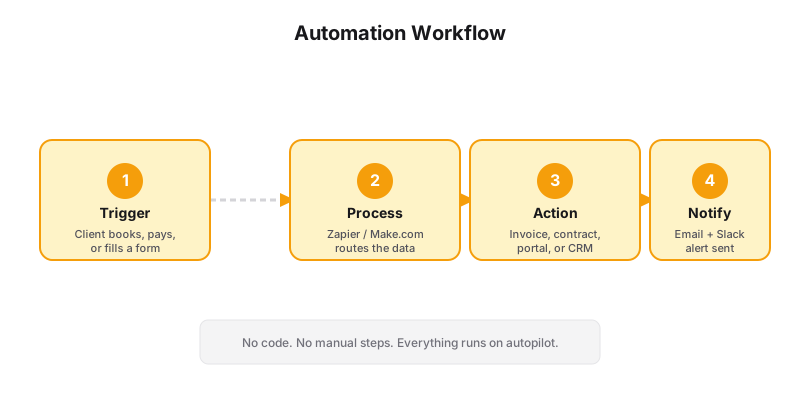
Create a Zapier automation that triggers when a new payment is received in Stripe:
- Payment received (trigger: Stripe)
- Create client record (action: Google Sheets or Notion)
- Send welcome email (action: ConvertKit or Gmail)
- Create intake form (action: JotForm or Typeform)
- Create calendar (action: Google Calendar — block out recurring session slots)
- Create portal access (action: Notion or your portal tool)
Set this up once. Every new client gets onboarded in under 30 seconds — no manual data entry, no “welcome” emails you forgot to send, no intake forms you meant to share.
For a deeper walkthrough, read our automated onboarding guide.
Automation 5: Payment Follow-Ups
Time saved: 1-2 hours/week. Tools: Stripe built-in features.
The setup:
Most coaches spend hours chasing late payments. Stripe handles this automatically:
- Smart retries: Stripe automatically retries failed payments on a smart schedule (2 days, 4 days, 7 days, 14 days).
- Email receipts: Automatic receipt emails when a payment succeeds.
- Payment reminders: Send automatic reminders 3 days before a subscription payment is due.
If you use Generativity Media’s Grow plan, these automations are built into your site’s payment system — automated invoicing, late payment reminders, and receipt delivery are included.
The Automation Stack
Here’s the minimum viable setup for an automated coaching business:
| Tool | Cost | What It Automates |
|---|---|---|
| Otter.ai | $20/month | Session notes |
| ChatGPT Plus | $20/month | Email drafts, content outlines |
| Zapier | $29/month | Cross-tool workflows |
| Stripe | 2.9% + $0.30 | Payment retries, receipts |
| Content Brain | Included in Grow/Scale | Full content production |
| Total | $69/month + transaction fees | 15+ hours/week saved |
What Not to Automate
Some things should never be automated:
- Discovery calls — The human connection in a discovery call is irreplaceable. AI can’t build trust for you.
- Difficult client conversations — If a client is struggling, going off-track, or considering ending coaching, be present. Don’t automate or defer.
- Your unique frameworks — The intellectual property that makes your coaching unique shouldn’t be outsourced to generic AI. Train custom models (or use Content Brain) to ensure your voice stays yours.
The One Automation to Start With
If you do one thing this week, automate session notes. It’s the highest-ROI automation because it gives you immediate time back and improves your client experience at the same time.
Set up Otter.ai for your next three sessions. After each one, use the AI summary feature to draft a client recap. By the end of the week, you’ll have 3+ hours back and clients who feel more taken care of.
When you’re ready to go further, upgrade to a Grow plan that includes automated client onboarding, content production, and payment workflows — all in one system.
Session notes are the first automation. Track them simply. The onboarding pipeline is the next one.
Want to see what a fully automated coaching business looks like? Let’s audit your current stack.