The Tech Stack Every Coach Needs to Stop Burning Out
Most coaches burn out not from coaching, but from admin. Here's exactly what tools you need, how to set them up, and what to spend on each tier of your business.


Here’s a number that stopped us cold when we started working exclusively with coaches: 82% of solo coaching businesses burn out within three years.
Not because the coaching wasn’t good. Not because they couldn’t find clients. Because they tried to be both the coach and the entire operations team.
We’ve built over 50 coaching systems at Generativity Media, and the pattern is always the same. The coaches who thrive aren’t the ones with the most impressive websites — they’re the ones who treat their tech stack as a system rather than a collection of random tools.
This guide walks through exactly what you need at each stage of your coaching business, with specific product recommendations, setup steps, and links to everything mentioned.
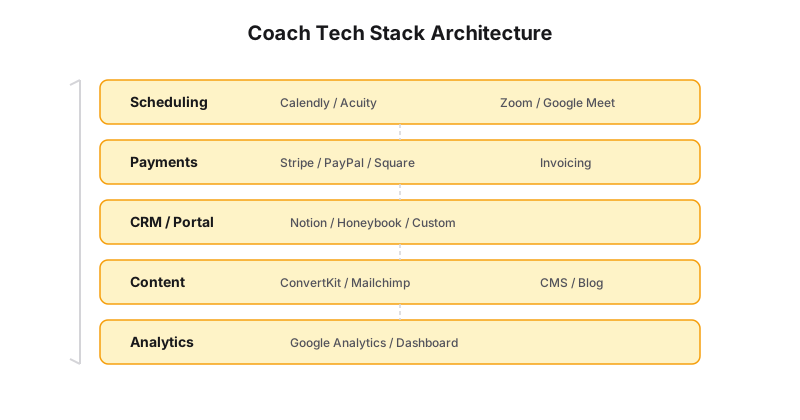
Why Most Coaching Tech Stacks Fail
The default approach is reactive: a coach starts with a Squarespace site, adds Calendly when booking gets annoying, then patches in Stripe, then a Google Drive folder for client materials, then Slack for communication, then a Mailchimp account they never use.
The result isn’t a system — it’s a sprawl. Data lives in twelve places. Clients email you because they can’t find the intake form. You manually transfer payment records from Stripe to your spreadsheet every Friday.
A real tech stack isn’t a list of tools. It’s an integrated pipeline that moves a client from discovery → booking → payment → onboarding → delivery → retention without you touching anything.
Pillar 1: Booking & Payments
This is the highest-leverage fix for any coach. If money isn’t flowing automatically, nothing else matters.
The Minimum Setup
Discovery calls should book themselves. Here’s what you need:
Calendly — The industry standard for scheduling. The free tier lets you set your availability, buffer times, and day limits. Upgrade to the Standard plan ($12/month) for workflows that send SMS reminders and follow-up emails.
Acuity Scheduling — A strong alternative if you need more coaching-specific features like intake forms built into the booking flow, package sales, and gift certificates. The Emerging plan ($16/month) covers most solo coaches.
Stripe or Square — You need a payment processor that integrates with your booking tool. Stripe has better API access and developer ecosystem. Square has better physical POS if you do in-person workshops.
The Integrated Flow
Here’s what a proper booking pipeline looks like:
- Client clicks your “Book a Call” button (anywhere on your site)
- They see your availability in real-time (no back-and-forth emails)
- They fill out an intake form during booking (goals, budget, timeline)
- They pay upfront (deposit or full session fee — before the call)
- They get a calendar invite with Zoom link, prep materials, and reschedule policy
- They receive automated reminders at 24h and 1h before
This eliminates the #1 time-waster for coaches: the “let me check my calendar” dance.
If you’re using Generativity Media’s Launch plan, this entire pipeline comes pre-built in your website. Booking, payment collection, and intake forms are integrated into a single flow so you don’t have to duct-tape Calendly + Stripe + Google Forms together yourself.
Pillar 2: Client Delivery & Portals
Here’s the truth most coaches don’t realize until they’re drowning in Slack messages: your clients don’t need constant access to you. They need access to your content, your schedule, and your materials.
A client portal eliminates 80% of the admin overhead that drives coaches to quit. It’s a single place where clients can:
- Book sessions (without emailing you)
- Access worksheets and recorded sessions
- View their progress and session notes
- Message you (asynchronously, not via text at 10pm)
- Make payments and view their invoice history
Tool Options by Budget
Free / DIY — Notion with a shared client database. Create a template page per client with embedded Google Calendar, a worksheet hub, and a simple progress tracker. It’s ugly but functional, and it costs nothing.
Mid-tier — PandaDoc or HelloSign for contracts and proposals, combined with Google Workspace shared drives for content delivery. The Business Starter plan ($7/user/month) gives you professional email, 30GB storage, and shared drive capabilities.
Purpose-built — Practice or Sessions are coaching-specific platforms that combine scheduling, payments, content delivery, and messaging. They run $30-60/month but replace 4-5 separate tools.
Done for you — Generativity Media’s Grow and Scale plans include a custom-built client portal integrated directly into your website. No third-party platform. No monthly subscription to Practice or Sessions. Just a branded portal that works exactly the way your coaching model works — whether you do one-on-one, group programs, courses, or all three.
What a Portal Actually Saves You
Let’s put numbers on it. A solo coach with 15 active clients typically spends:
| Activity | Without Portal | With Portal | Time Saved/Month |
|---|---|---|---|
| Scheduling sessions | 5 hours | 0.5 hours | 4.5 hours |
| Sending materials | 3 hours | 0.25 hours | 2.75 hours |
| Answering admin questions | 6 hours | 1 hour | 5 hours |
| Payment follow-ups | 2 hours | 0.25 hours | 1.75 hours |
| Total | 16 hours | 2 hours | 14 hours |
That’s 14 hours per month — nearly two full working days — that goes back into coaching, content, or actually having a life.
Pillar 3: Content Systems
The second biggest burnout driver is content. Coaches know they need to stay visible, but producing posts, emails, and videos takes time they don’t have.
The solution isn’t “post less.” It’s building a content system that works while you sleep.
The Idea Capture Loop
Most coaches lose 80% of their best content ideas because they don’t capture them. Here’s the fix:
Keep a voice memo note on your phone (iOS Voice Memos or Otter.ai). Every time you have a coaching insight, record it immediately. Later, transcribe and file it.
Use Notion as your content backlog. Create a simple database with fields for: idea, format (post / email / video / story), status (draft / scheduled / published), and source (client question / personal insight / trend).
Batch one month of content in a weekend. Here’s the exact process:
- Day 1 — Brain dump: Review your Notion backlog. Pull 20 ideas. Record 2-3 minutes of voice notes on each.
- Day 1 — Transcribe: Use Otter.ai or Descript to turn voice notes into rough drafts. This is faster than writing from scratch because you speak differently than you write — more natural, more “you.”
- Day 2 — Polish: Edit each draft into its final format. One blog post becomes: 3 social posts, 1 email newsletter, 1 short-form video script, and 1 story.
- Day 2 — Schedule: Use Buffer (free tier: 3 channels) or Typefully (great for Twitter/threads) to schedule everything for the month.
The Repurposing Funnel
One piece of long-form content should generate at least 5 pieces of short-form content. Here’s the funnel we use at Generativity Media:
- Write one long-form piece (blog post, newsletter, or podcast episode)
- Extract 3-5 key insights — these become individual social posts
- Turn one insight into a hook — becomes a short-form video script (Reel / TikTok / Short)
- Turn one story into a case study — becomes a testimonial-style post
- Condense everything into a thread — becomes a Twitter/X thread or LinkedIn carousel
This is the engine behind Content Brain, our AI-powered content system. It learns your voice, your frameworks, your stories, and generates on-brand content that sounds exactly like you. Even without it though, the principle holds: systematize creation, don’t individualize it.
The Real Cost of Doing Content Wrong
If you spend 10 hours a week on content (which is average for a solo coach), that’s 520 hours a year. At $150/hour coaching rate, that’s $78,000 in opportunity cost — money you could have earned actually coaching.
A content system doesn’t just save time. It literally pays for itself.
Pillar 4: Email & Nurture
Most coaches treat email as an afterthought — a Mailchimp account with a “Join my newsletter” popup that sends sporadically.
Email is the highest-ROI channel you have. A proper nurture sequence can convert a cold lead to a paying client without you ever getting on a discovery call.
The Minimum Viable Sequence
ConvertKit (free up to 1,000 subscribers) is built for creators and coaches. It has visual automation builders, tag-based segmentation, and landing pages. Unlike Mailchimp, it’s designed for the way coaches actually sell — relationship-first, not broadcast.
Here’s a 5-email sequence that generates consistent leads:
Email 1 (Welcome) — “Hey, here’s what I do and who I help.” Include a free resource (worksheet, checklist, or guide). This establishes value immediately.
Email 2 (Story) — “Here’s why I started coaching.” Share your origin story. People buy from coaches they trust, and trust comes from vulnerability and specificity.
Email 3 (Framework) — “Here’s my core coaching framework.” Give away your best framework for free. This demonstrates expertise and pre-sells your methodology.
Email 4 (Social Proof) — “Here’s what happened when [client] worked with me.” Case study or testimonial. Specific numbers and before/after details.
Email 5 (Offer) — “Here’s how to work with me.” Direct call to action to book a discovery call. Include a limited-time incentive (free session add-on, discount for first month, etc.).
Automating the Sequence
Set this up once in ConvertKit and it runs forever. Every new subscriber gets tagged, enters the sequence, and emerges on the other side as a warm lead ready for a call.
If you’re on Generativity Media’s Grow plan, we build this entire nurture sequence for you — written in your voice, set up in your email platform, and integrated with your booking system so leads can go from email → discovery call → paid client without you touching anything.
Putting It All Together: The Stack by Business Stage
Stage 1: New Coach (0-5 clients)
Budget: $0-50/month
| Tool | Purpose | Cost |
|---|---|---|
| Calendly (Free) | Booking | Free |
| Stripe | Payments | 2.9% + $0.30/transaction |
| Notion | Content backlog + client tracking | Free |
| ConvertKit (Free) | Free up to 1K subscribers | |
| Google Workspace | Email + Drive | $7/month |
Total: ~$7/month + payment processing
Stage 2: Growing Coach (5-20 clients)
Budget: $100-300/month
| Tool | Purpose | Cost |
|---|---|---|
| Acuity Scheduling | Booking + intake forms | $16/month |
| Stripe | Payments | 2.9% + $0.30/transaction |
| Practice | Client portal | $40/month |
| Content Brain | AI content generation | Included in Grow plan |
| ConvertKit | Email automations | $29/month (up to 3K subs) |
| Google Workspace | Professional email | $12/month |
Total: ~$100/month + payment processing
Or get all of this (minus Stripe) on the Grow plan at $300/month with a custom website, Content Brain, client portal, priority support, and done-for-you setup. No piecing together six different subscriptions.
Stage 3: Established Coach (20+ clients)
Budget: $500+/month
At this stage, you need a fully custom system. Off-the-shelf tools create bottlenecks because your coaching model has specific requirements — group programs, course delivery, multi-tier pricing, compliance needs.
This is when you graduate to a Scale plan or equivalent custom solution. Everything is integrated. Your website, portal, content system, email, and payments talk to each other. You have a dashboard that shows you exactly what’s happening in your business. And you spend your time coaching, not managing.
Where to Start This Week
Don’t try to implement all four pillars at once. Pick the one that hurts most:
If booking is your bottleneck: Connect Calendly to Stripe this week. Add payment collection to your discovery call booking. If you have a Launch site, this is already done.
If content is your bottleneck: Spend one weekend batching a month of content. Use the repurposing funnel above to stretch one idea into five pieces. Or let Content Brain do it for you.
If delivery is your bottleneck: Set up a simple Notion portal for your current clients. Centralize all materials, scheduling, and communication. Upgrade to a proper portal when you hit 10+ clients.
If email is your bottleneck: Write the 5-email nurture sequence above. Set it up in ConvertKit. Drive traffic to your lead magnet. The sequence runs forever and generates leads while you sleep.
The Bottom Line
The coaches who make it past the three-year burnout mark don’t work harder — they systematize. Every hour you spend setting up infrastructure pays back ten hours of freedom later.
Tech isn’t the enemy of coaching. Bad tech stacks are. The right system doesn’t replace you — it lets you focus on the one thing only you can do: coach.
The stack is the machine. Session notes and a tech audit are how it serves the hour.
Ready to stop being your own IT department? Let’s build your system.