10 AI Tools Every Coach Should Be Using in 2026
AI isn't coming for your coaching job — it's coming for your admin. Here are the exact tools that save coaches 15+ hours a week, with use cases and setups for each.


Most coaches fall into one of two camps on AI: either they’re ignoring it entirely (“I don’t use AI for my coaching”) or they’re using ChatGPT as a novelty toy (“Write me a LinkedIn post about goal-setting”).
The coaches getting real results from AI are doing something different. They’re not using AI to replace their expertise — they’re using it to eliminate the 20 hours of admin that steals time from coaching every week.
Here are the 10 AI tools that actually move the needle for coaching businesses, listed in order of immediate impact.
1. Content Brain (Generativity Media)
Content Brain is our proprietary AI system built specifically for coaches. Unlike generic ChatGPT prompts, it learns your voice, your coaching frameworks, your stories, and your specific niche — then generates on-brand content that sounds exactly like you.
What it saves: 8-10 hours/week on content creation. One coach went from 10 hours on content to 30 minutes.
Best for: Coaches who know they need to post consistently but don’t have time to write everything from scratch.
It’s included in the Grow and Scale plans along with your website and client delivery system.
2. ChatGPT (Custom GPTs)
The free version of ChatGPT is useful. The paid version ($20/month) with custom GPTs is where it gets powerful for coaches.
Set up a custom GPT for your coaching practice:
- Go to “Explore GPTs” → “Create a GPT”
- Upload your coaching framework documents (PDFs of your methodology, worksheets, session structures)
- Tell it: “You are my coaching assistant. When I describe a client situation, generate a session plan using my frameworks. Write in my voice.”
- Use it to: draft session plans, write email responses to clients, generate reflection questions, create worksheets
One prompt template to steal:
“I’m a [niche] coach working with a client who [situation]. Using my coaching framework [name of framework], generate a 60-minute session plan with: opening check-in, core exercise, reflection questions, and action commitments. Write in a warm but direct tone.”
3. Otter.ai
Otter.ai transcribes your coaching sessions, calls, and voice notes in real-time. The Pro plan ($20/month) gives you 1,200 minutes of transcription per month.
The coaching use case: Record your client sessions (with permission). Otter generates a full transcript plus an AI summary with action items. You never need to take notes during a session again. Before the next session, review the AI summary to pick up where you left off.
Pro tip: Create a “Session Notes” folder in Otter that your clients can access. After each session, share the AI summary with them automatically. They get a written record of what you covered. You save 15 minutes per session writing notes.
4. Descript
Descript is AI-powered video and audio editing. The Business plan ($40/month) includes studio sound, filler word removal, and AI eye contact correction.
The coaching use case: Record your video content (Reels, YouTube, course lessons). Descript transcribes the audio, lets you edit the transcript (which edits the video), removes “ums” and “uhs” automatically, and can generate short clips from long-form recordings.
One 20-minute recording can become: 3 Reels, 1 YouTube Short, 1 podcast episode, and 1 blog post — all edited in under an hour.
5. Notion AI
Notion with Notion AI ($10/month add-on) is a second brain for your coaching business.
Use it to: Draft email sequences, summarize your brainstorming sessions, generate meeting agendas, create SOPs for your business processes, and auto-fill client intake summaries.
The AI writes inside your existing Notion pages — it already knows your business structure, client database, and content calendar.
6. Perplexity Pro
Perplexity ($20/month) is an AI research tool that cites sources. Unlike ChatGPT which can hallucinate, Perplexity shows you where each fact came from.
The coaching use case: Research your niche topics with citations you can trust. “What are the latest studies on [coaching methodology]?” or “What scientific research supports [specific technique]?” Perplexity returns answers with links to peer-reviewed papers and credible sources — which you can reference in your content to build authority.
7. Zapier AI
Zapier connects your tools without coding. The AI-powered version (Starter plan, $29/month) lets you describe automations in plain English: “When a new client pays in Stripe, add them to my ConvertKit email list and create a Notion client page.”
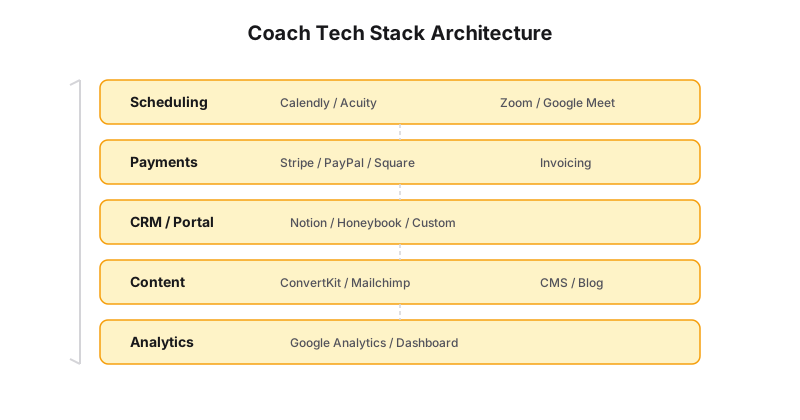
The coaching use case: Connect Calendly → Stripe → ConvertKit → Notion into one workflow. A booking triggers payment, which triggers email tagging, which creates a client record. No Zapier experience needed.
8. Typefully
Typefully is an AI-powered writing tool for social media. The Growth plan ($29/month) includes AI drafts, thread creation, and optimal posting time analysis.
The coaching use case: Write one thread about a coaching insight. Typefully’s AI helps you expand it, suggests better hooks, and can repurpose it into shorter posts. Schedule everything for the month in one sitting.
9. Motion
Motion ($34/month) is an AI calendar that automatically schedules your tasks. You put your to-do list in; it finds time in your calendar for everything.
The coaching use case: Stop manually blocking time for content creation, admin, and client prep. Motion automatically schedules these around your fixed commitments (sessions, calls, events). If something overruns, Motion reshuffles the rest of your day.
10. Coach-Specific AI: Practice.ai
Practice has started rolling out AI features specifically for coaches: automated session note generation, AI-assisted intake summaries, and smart scheduling suggestions. The Pro plan ($50/month) includes these features.
| Tool | Best For | Price | Key Feature |
|---|---|---|---|
| ChatGPT | Content & brainstorming | Free / $20/mo | Custom instructions per client |
| Otter.ai | Session transcription | Free / $16.99/mo | Auto-join meetings |
| Notion AI | Note-taking & docs | $10/mo per member | Write, summarize, edit inside Notion |
| Descript | Video & audio editing | Free / $24/mo | AI-powered editing |
| Zapier | Workflow automation | Free / $19.99/mo | 5,000+ app integrations |
Your AI Stack by Priority
If you’re overwhelmed, start here:
Month 1 — Get Otter.ai ($20/month). Stop taking session notes. Save 5 hours/week.
Month 2 — Add ChatGPT Custom GPT ($20/month) or Content Brain. Automate your content drafts. Save 5-8 hours/week.
Month 3 — Add Zapier ($29/month) or upgrade to a Grow plan that includes integrated automation. Connect your booking, payment, and email systems. Save 3-5 hours/week.
Total monthly spend: $69-120. Total time saved: 13-18 hours/week. That’s a 10-20x ROI on the tools.
The Warning
AI tools amplify whatever system you already have. If your business is disorganized — client info in ten places, no content calendar, manual booking — AI will just help you do the wrong things faster.
Get the foundation right first (website, booking, payments, delivery), then layer AI on top to accelerate everything.
The tool is a layer. Session notes and the stack are the craft the layer serves.
Not sure what your biggest automation gap is? Let’s audit your stack.